

Introduction to Instagram Analytics Tools
Data analysis reveals trends and patterns that can inform content strategy, allowing users to tailor their posts to what works best. As brands invest more in their Instagram presence—70% of marketers are expected to increase their Instagram marketing budgets—leveraging these tools becomes essential for optimizing performance and achieving marketing goals.
Incorporating these features into your analytics toolkit can help you maximize your Instagram marketing efforts and ensure you stay ahead of the competition.
In this article, we’ll compare some of the best Instagram analytics tools available, examining their features, pricing, and overall effectiveness to help you make an informed decision for your Instagram strategy.
Best Instagram Analytics Tools
1 – Social Status
Social Status is one of the only dedicated social analytics tools on the market, so it offers much deeper insights than you get with other all-in-one apps.
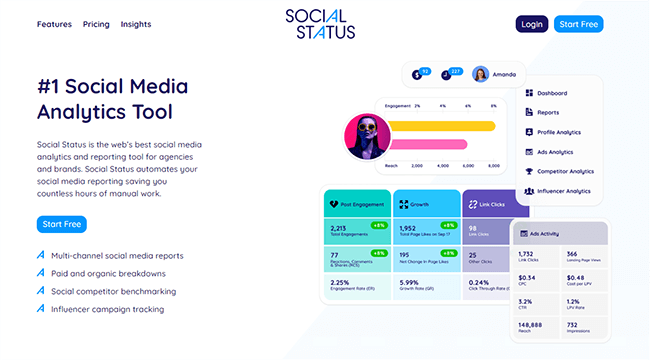
Social Status sorts its analytics into four different reports: Profile Analytics, Ads Analytics, Competitor Analytics, and Influencer Analytics.
I found the Profile Analytics report to be the most useful. It provides all the metrics you could need to analyze your Instagram account, posts, Reels, and Stories (as well as all your other social media posts and pages across different networks).
You can track things like organic reach rate (ORR), impressions, replies, taps back/forward, and link clicks. Plus, learn more about your followers with audience demographic data that tell you their gender, ages, countries, etc.
The Ads Analytics report is great too. A lot of other Instagram analytics tools focus exclusively on organic performance, so it’s nice that you can get insights into both your organic and paid campaigns in one place with Social Status.
And let’s not forget about its excellent Report Builder. Use it to create, automate, and deliver custom, multi-channel, white-label reports to your clients. You get to choose exactly the data you want to show, and you can export reports in various formats including CSV, PDF, and PPTX.
Pros
2 – Sendible
Sendible does not only get Instagram analytics, but also help you schedule social media posts, manage comments and replies, curate content, and more.

You get a lot of data with Sendible. All in all, there are over 200+ analytics modules, which is more than most other tools I’ve tried.
Analytics modules include metrics, graphs, and visualizations of things like your reach, post engagements, follower growth, etc. Plus, insights into your best times to post, best-performing posts, follower demographics, and more.
You can mix and match analytics modules in the report builder to create fully custom reports. Alternatively, start from a pre-built template. If you want, you can even combine your Instagram analytics with your other social media profiles and pages for cross-channel reports.
And I haven’t mentioned my favorite thing about Sendible yet, which is the fact that it’s fully white label. That means you can add your branding to the app and host it on your website. Then, onboard clients and have them connect their socials like it’s your own in-house software.
I haven’t seen any other Instagram analytics tool that can do this. It’s exclusive to Sendible, which makes it a great choice for marketing agencies.
Pros and cons
3 – Pallyy
Pallyy is one of the more affordable Instagram analytics tools out there. It has a great free plan and I like its slick, stylish user interface.
You can see Pallyy was built with creators in mind. It’s super easy to use and provides the kind of data influencers need to measure their growth & performance, and better understand their audience.
In the analytics dashboard, you’ll find stats about your Instagram profile, posts, stories, and competitors. Plus, you can also use it to analyze your performance on other networks like Facebook and LinkedIn.
I particularly like the fact that Pallyy tells you your best time to post, based on when your audience is most active. This can help you to optimize your schedule and get more views and engagements.
And the report builder is one of my personal favorites. It’s much easier to use than most other report builders I’ve tried—you just choose your metrics and reporting period, then generate and export it.
Unfortunately, though, I couldn’t see any way to schedule/automate reports. It looks like you have to do it manually each time, which is a bit disappointing.
Aside from analytics, Pallyy also gives you other useful Instagram tools including a bio link builder, scheduling/publishing tools, unified inbox, team collaboration features, and more.
While Pallyy’s premium plan is super affordable for individual users, you have to pay an extra $29/month per additional user, which makes it not so good for teams.
Pros and cons
4 – Iconosquare
Iconosquare is one of the most powerful Instagram analytics tools on the market. It offers industry-leading analytics, publishing, and more. In addition to Instagram, it also supports other networks.
You can track over 100+ metrics with Iconosquare, including stats about your reach, engagement, audience, and follower growth. All metrics can be turned into data visualizations (i.e. graphs and charts) in one click.
My favorite feature is the customizable dashboard. It lets you choose what widgets you want to display and rearrange them in whatever order you want. The result is a personalized page that shows you all the statistics and metrics you’re most interested in, with none of the noise.
I also like the fact that Iconosquare sends reports automatically straight to your inbox (or your client’s inbox), so you don’t have to manually build them each week/month/quarter/year.
Another cool feature: Iconosquare offers social listening, which means it can track and analyze mentions of specified keywords, hashtags, competitors, etc. across Instagram and beyond. And it can pull in data about those mentions into your reports.
Pros and cons
5 – Agorapulse
Agorapulse offers a lot of metrics you don’t get with other Instagram analytics tools.

For example, it’s one of the only tools I’ve tried that can measure the ROI of your Instagram efforts in actual dollars and cents, making it a good choice for social media managers who want to show their brands the impact they’re having on their bottom line.
Its reports are super detailed too. Depending on what you want to analyze, you can pull up reports on your Instagram audience, content, stories, community management, etc. in a couple of clicks.
Each of those reports comes with a wealth of data, including all the metrics you’d expect to see (like engagement rates, follower growth, impressions, audience demographics, etc.) plus lots of deeper insights.
I particularly like the fact that Agorapulse pulls data from its social listening tool into your reports to serve up metrics like your ‘brand awareness score’ (which is based on the number of mentions and shares you get in the chosen period).
Aside from Instagram analytics, Agorapulse also offers reports for all your other social media profiles and pages. Plus, tools for social media publishing, inbox management, listening, employee advocacy, and more.
It has some pretty fantastic team collaboration features too. And you can even analyze each team member’s performance in Agorapulse (replies sent, tasks completed, etc.) alongside your Instagram analytics. All that being said, it’s a little pricey for teams as you pay per user.
Pros and cons
6 – Metricool
Metricool is an industry-leading Instagram analytics tool. Like other tools, it supports other networks and offers more social media-related features beyond Instagram analytics. There’s also a free plan.
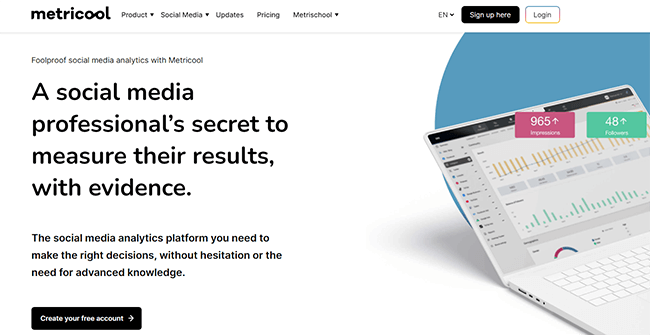
The Instagram analytics in Metricool are extremely detailed. You get access to highly visual data that provides insights into the growth of your Instagram audience, demographic information, account performance, and more.
You can also view detailed metrics that cover the performance of your posts. We’re talking metrics like engagement, impressions, likes, comments, saves, etc. And, those engagement metrics are super important for the Instagram algorithm!
There are overviews so you can see performance at a glance, and in-depth views that show you how each post performs. With additional analytics for Instagram Stories and Reels.
But that’s not all. There’s a report builder that allows you to pull in your Instagram analytics data and combine it with data from other social networks. The result? A report that will impress your clients. You can also export reports as PDF or PPT files.
Brands and creators running events will appreciate the hashtag tracking feature. This is a paid add-on but it’s extremely powerful.
In addition, you’ll find an Instagram bio link tool, and Instagram scheduling capabilities. When scheduling posts on the calendar, analytics from your accounts will be used to provide best times to post on Instagram and other social networks.
Pros and cons
7 – Brand24
Brand24 is great for finding out who’s talking about your brand on Instagram, as well as measuring overall brand awareness and sentiment.

It’s a dedicated web monitoring tool, which means it ‘listens out’ for mentions of any keywords you want to track across the web, including on Instagram, and lets you know about them.
Plus, it also analyzes the context of those mentions to provide deeper insights. For example, it can detect whether a mention is positive, negative, or neutral, and use that data to measure your brand sentiment.
One way I like to use Brand24 specifically for Instagram is to find influencers. It tells you the most popular posts and profiles that mention your target keywords, and assigns each profile an ‘influencer score’, making it easy to find the influencers that are having the biggest impact.
You could also use it to track topics and discover trends, monitor your competitors, and analyze the impact your Instagram efforts are having on brand awareness.
Just keep in mind that Brand24 doesn’t provide other, more general Instagram analytics, like information about the performance of your posts and your follower growth. It’s just for mentions.
Pros and cons
8 – SocialBlade
SocialBlade is a useful free social media analytics tool that provides basic statistics for Instagram, as well as YouTube, twitch, Twitter, and more.

I like how easy SocialBlade is to use. You don’t even need to sign up and log in to get started.
You just load up the site, then enter the @username of the Instagram profile you want to analyze in the search box and hit search.
It’ll load up a report with lots of Instagram statistics. Under the User Summary page, you can see top-level metrics like followers/following, average engagement rate, likes, comments, followers gained, rank, etc.
And if you switch over to the Detailed Statistics tab, you’ll see a more thorough breakdown with graphs to illustrate follower growth and media shares over time.
You don’t get the more advanced insights you do with other tools, like ‘best time to post’ recommendations and such. And I find the user interface super frustrating—it’s riddled with pop-up ads and banner ads.
But if you just want basic Instagram analytics and you don’t want to invest in a paid solution, it’s worth checking out.
Pros and cons
9 – Instagram Insights
Instagram Insights is the native analytics you can access from within the IG app. It’s free to use if you have a Business or Creator account and provides basic performance and audience statistics that you can feed back into your Instagram marketing strategy.

My main complaint with Instagram Insights is that you can only look back over 90 days of analytics data. So if you’re trying to track long-term trends and compare performance and growth year over year, you’re out of luck.
Plus, you can only view analytics within the app. You can’t build and export reports like you can with premium Instagram analytics tools. That’s probably going to be a deal-breaker if you need to share insights externally with your clients.
That said, if you just want to view basic metrics and insights like total accounts reached and engaged, total reel plays, follower demographics, etc. and you don’t need any of the other bells and whistles, it does the job.
Pros and cons
10 – Sprout Social
Sprout Social is one of the most expensive Instagram analytics apps I’ve tried. The starting price will doubt be too high for most users, but it could be a good choice for brands and agencies that have a bigger budget to work with.
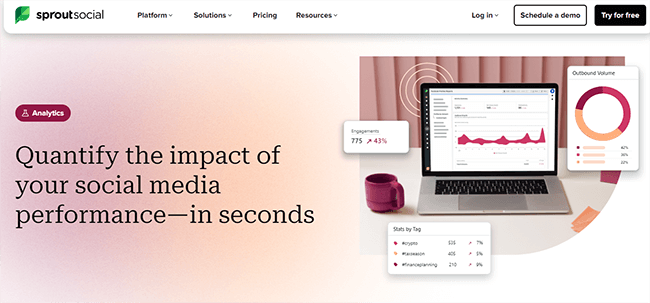
Sprout is designed to be an all-in-one social media management tool with everything you need to manage your whole social media presence in one place.
So, it’s not just for Instagram analytics. You also get a bunch of other tools for things like Instagram scheduling, inbox management, social listening, employee advocacy, influencer marketing, etc. And you can connect all your profiles and pages from different social networks.
Its analytics are impressive too. You get deeper insights than most other tools with all the statistics you could want about your Instagram profile, posts, audience, competitors, hashtags, ads, etc. I particularly like the way it tells you the best time to post on Instagram for maximum reach/engagement.
You also have the option of paying extra for Sprout’s Premium Analytics. This will give you access to 150+ more metrics, as well as interactive data visualizations and the report builder.
Pros and cons
Conclusion
The best choice for you will depend on many factors, including the metrics you want to analyze, the analytics features you need (e.g. reporting, client dashboards, etc.), the other tools you want (e.g. publishing, inbox management, etc.), and so on.
Choosing the best analytics method for your Instagram strategy involves several steps:
1. Define Your Goals
- Identify Objectives: Determine what you want to achieve—brand awareness, engagement, follower growth, or conversions.
- Set KPIs: Establish key performance indicators (KPIs) aligned with your goals, such as engagement rates or click-through rates.
2. Assess Your Audience
- Analyze Demographics: Use tools that provide insights into your audience’s age, gender, location, and interests.
- Understand Behavior: Identify when your audience is most active and what content they engage with the most.
3. Evaluate Available Tools
- Compare Features: Look for tools that offer metrics tracking, content performance analysis, audience insights, and competitor analysis.
- Consider Usability: Choose tools that are user-friendly and fit your team’s skill level.
4. Review Pricing
- Budget Considerations: Compare pricing structures—some tools offer free plans with basic features, while others require subscriptions for advanced analytics.
- Return on Investment: Assess whether the potential insights justify the costs based on your goals.
5. Test and Optimize
- Trial Periods: Take advantage of free trials to test multiple tools and see which one meets your needs best.
- Iterate Based on Data: Continuously monitor performance and adjust your strategy as needed to maximize results.
6. Seek Recommendations
- User Reviews: Check testimonials and case studies from other users in your industry to gauge effectiveness.
- Industry Benchmarks: Compare with competitors to find tools that are widely used and respected.
By following these steps, you can effectively choose the best analytics method to enhance your Instagram strategy and achieve your marketing objectives.