
Social Media Inbox Tools: Streamlining Your Social Media Management
Introduction
A. Definition of Social Media Inbox Tools
Social media inbox tools are software applications designed to consolidate all social media communications into a single interface. These tools allow brands and businesses to manage messages, comments, and notifications across various platforms—such as Facebook, Twitter, Instagram, and LinkedIn—streamlining interactions and improving customer engagement.
B. Importance of Social Media Inbox Management in Modern Marketing
In today’s digital landscape, social media is not just a marketing channel; it’s a vital component of customer service and brand management. According to a recent report from HubSpot, 54% of consumers prefer to communicate with brands through social media over traditional channels like email or phone. Thus, effective management of social media communications has become crucial for maintaining customer satisfaction and fostering brand loyalty.
C. Brief Overview of the Challenges in Managing Multiple Social Media Accounts
With the increasing number of social media platforms and the rising volume of customer interactions, managing multiple accounts can be overwhelming. Brands often face challenges such as:
- Delayed response times leading to frustrated customers.
- Inconsistent messaging across platforms.
- Difficulty in tracking engagement metrics.
- Challenges in team collaboration when handling inquiries.
Why Use Social Media Inbox Tools?
A. Centralized Management of Multiple Social Media Accounts
Social media inbox tools provide a centralized dashboard where all messages from various platforms are gathered. This eliminates the need to switch between different apps, significantly simplifying the management process. According to a survey by Sprout Social, businesses using these tools reported a 30% increase in efficiency in handling customer inquiries.
B. Improved Response Times to Customer Inquiries
Quick responses are essential for customer satisfaction. Research from Conversocial indicates that 72% of consumers expect a reply within an hour of reaching out on social media. Inbox tools facilitate faster responses through notifications and the ability to prioritize urgent messages, helping businesses meet these expectations.
C. Enhanced Team Collaboration
These tools often include features that allow multiple team members to view and respond to messages in real-time. This collaborative environment fosters communication, reduces the chances of overlapping responses, and ensures that customer inquiries are addressed promptly and accurately. For example, tools like Hootsuite allow teams to tag members in conversations, clarifying responsibility and streamlining follow-ups.
D. Better Tracking and Analytics
Social media inbox tools often come equipped with built-in analytics that help brands track engagement metrics, response times, and customer satisfaction levels. This data can be invaluable for refining strategies and understanding customer needs. For instance, businesses using social media management tools can identify peak inquiry times and adjust staffing accordingly.
E. Time and Resource Savings
By automating routine tasks, such as responding to frequently asked questions, social media inbox tools can save businesses considerable time and resources. A report from McKinsey indicates that automation can increase productivity by up to 30%, allowing teams to focus on more complex customer interactions and strategic initiatives.
Key Features of Social Media Inbox Tools
A. Unified Inbox
A unified inbox is perhaps the most crucial feature, allowing users to see all messages from various platforms in one place. This not only saves time but also provides a comprehensive view of customer interactions, helping teams maintain a cohesive brand voice.
B. Message Filtering and Categorization
Advanced filtering options enable teams to categorize messages by type—such as inquiries, complaints, or compliments. This categorization helps prioritize responses based on urgency and relevance, ensuring that critical issues are addressed promptly.
C. Automated Responses and Chatbots
Many social media inbox tools integrate chatbots to provide immediate responses to common questions. This feature not only improves response times but also frees up human agents to tackle more complex inquiries. According to a study by Salesforce, 69% of consumers prefer self-service options, underscoring the value of automation in enhancing customer experiences.
D. Team Collaboration Features
Effective collaboration features, such as internal notes, assignment tools, and tagging capabilities, allow team members to communicate efficiently without leaving the inbox platform. This ensures that everyone is informed about ongoing conversations and helps maintain continuity in customer interactions.
E. Social Listening Capabilities
Social listening tools integrated into inbox platforms allow brands to monitor mentions, keywords, and trends related to their products or services. This capability enables proactive engagement with customers and helps identify potential issues before they escalate.
F. Analytics and Reporting
Comprehensive reporting tools provide insights into engagement metrics, response times, and team performance. By analyzing this data, brands can adjust their strategies to enhance customer satisfaction and improve overall social media performance.
G. Integration with CRM and Other Tools
Many social media inbox tools offer integrations with Customer Relationship Management (CRM) systems and other marketing tools. This seamless connectivity enables businesses to maintain a holistic view of customer interactions across different channels, enhancing their ability to personalize responses and build stronger relationships.
Social media inbox tools are indispensable for modern businesses aiming to streamline their social media management. By centralizing communications, improving response times, and enhancing team collaboration, these tools not only facilitate better customer service but also contribute to more effective marketing strategies. In an era where consumer expectations are higher than ever, leveraging the capabilities of social media inbox tools is essential for any brand looking to thrive in the digital space.
Now, let’s take a look at the best social media tools that include a unified inbox:
The best social media inbox tools compared
Most of them are “all-in-one” social networking tools. This suggests that you will get a social media inbox along with other important features like post scheduling and analytics/reporting.
One benefit of this is that it lets you focus the majority of your social media marketing efforts on a single product. Let’s examine each of these in more detail:
1 – Buffer
Buffer is a widely used social media management tool that offers features for scheduling posts, analyzing performance, and managing social media interactions through its unified inbox. It aims to simplify the management of multiple social media accounts by providing a centralized platform for communication and engagement.
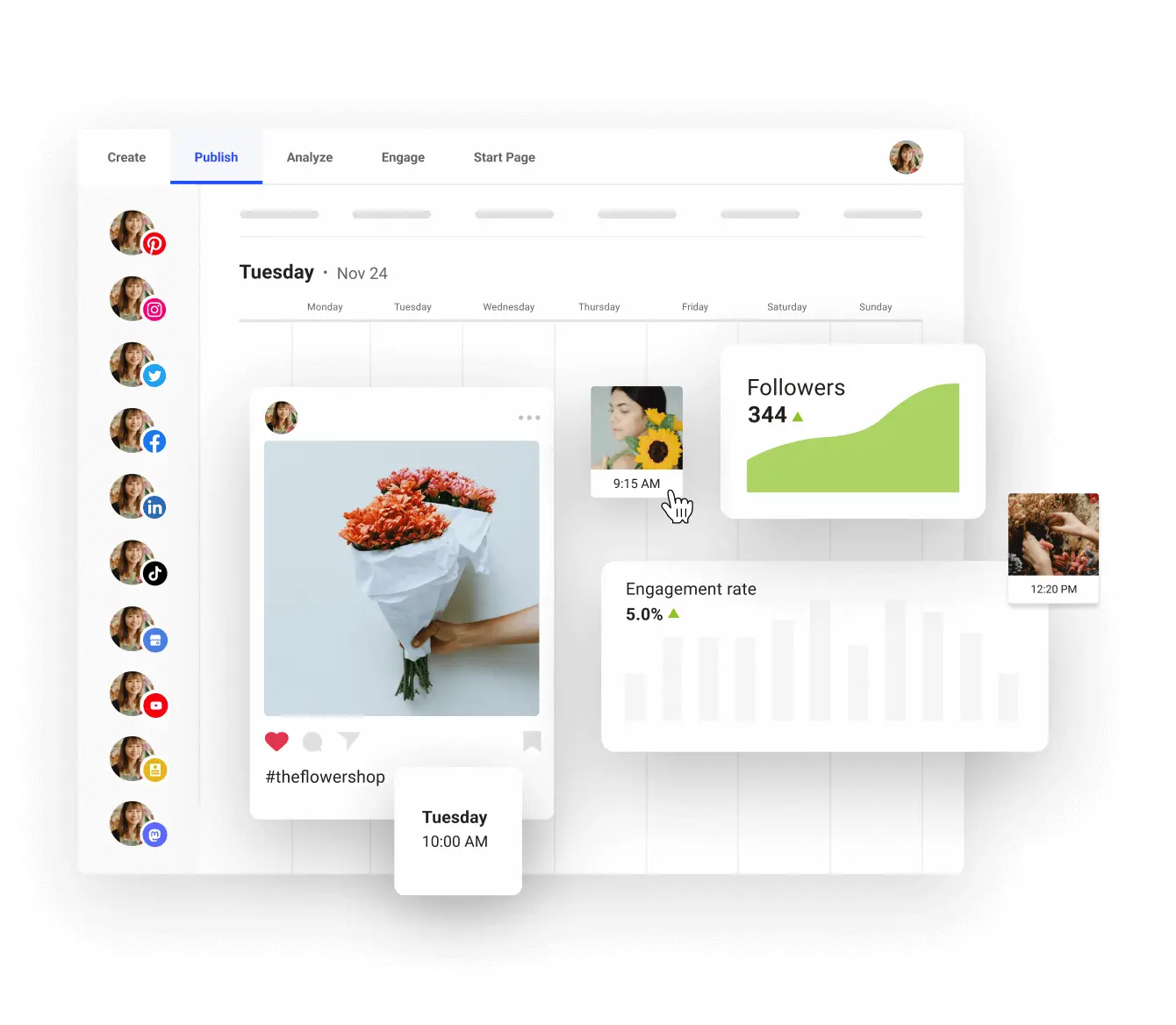
Buffer’s inbox allows users to view and respond to comments and messages across various social media platforms in one place. This feature enhances efficiency and ensures that no message goes unanswered.
Known for its intuitive user interface, Buffer is designed for simplicity, making it accessible for users of all skill levels. The dashboard is clean and straightforward, facilitating quick navigation.
It integrates seamlessly with a variety of platforms, including Facebook, Twitter, Instagram, and LinkedIn, as well as third-party applications like Canva for graphic design.
It provides detailed analytics on post performance, engagement rates, and audience demographics. This data helps businesses understand their audience better and refine their social media strategies.
Users can schedule posts in advance, allowing for a consistent online presence. The automation features, including posting times and frequency, help save time while maintaining engagement.
Buffer offers extensive documentation, tutorials, and a responsive customer support team to assist users in maximizing the tool’s potential.
Pricing: Buffer offers a range of pricing plans, from a free tier for individuals and small businesses to more comprehensive plans for larger teams and enterprises. The paid plans include additional features such as advanced analytics and increased posting capabilities.
2 – Agorapulse
Agorapulse has the best social media inbox of any tool on this list. It also covers off a lot of other all-in-one social media functionality such as publishing & reporting.

Initially, it arranges your social media accounts according to brands, allowing you to focus on the accounts that require attention at that particular moment. Twitter, Facebook, LinkedIn, Instagram, and other well-known social networks are the sources of comments, @mentions, RTs, and direct messages.
On your Facebook and Instagram advertisements, you may also respond to comments.
You can read through all of your communications in Agorapulse and review them as you go. You have the option to like, react, RT, or give a team member an assignment.
One especially useful feature is that you can see the conversation thread associated with a social message in addition to the message itself when viewing it. Put an end to your further exploration.
By setting rules, an automated inbox assistant can assist you in organizing your email. Furthermore, a fantastic feature that makes sure team members’ communications don’t overlap is collision detection.
There are more built-in time-saving features. For instance, you don’t need to go to Facebook directly to block users—you can do it right within the app. Excellent for handling spammers.
You may take care of your social mail even on the go with a mobile app. Additionally, stored replies might save you a great deal of time.
In addition to the wonderful social inbox, there’s a strong social scheduling tool with direct Instagram scheduling, social media listening, and extensive reporting and analytics features.
Price: A limited free account is available. Paid plans start from $49/month (billed annually). Try any paid plan free for 30 days.
3 – Pallyy
Pallyy is a different comprehensive social media toolbox that has some special Instagram-specific features, such a bio link tool. Additionally, it has one of the greatest social media inboxes I’ve ever used.
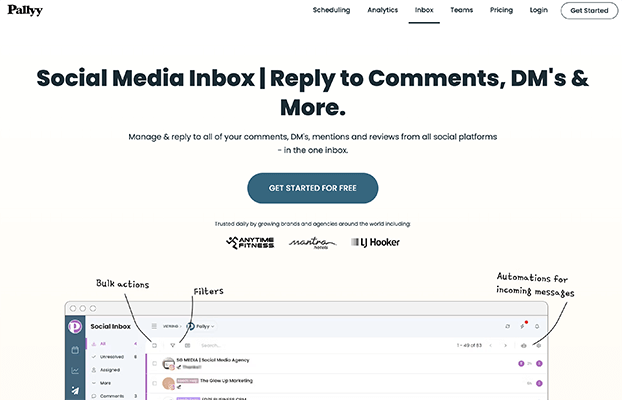
The inbox’s user interface is comparable to that of Gmail. It is particularly simple to use because it seems familiar right away.
Although Pallyy’s inbox feels lightweight, some other apps have a few more bells and whistles. It facilitates processing social messages.
All the essential tasks remain available, such as adding labels, designating team members, liking and retweeting content, and responding to communications on social media. Most significantly, you can archive and mark modifications as reviewed.
Pallyy is an excellent choice for bloggers, content producers, and business owners considering its pricing point. Compared to most other tools on this list, it offers a lower entrance price.
Team accounts and AI captions available as an add-on.
Price: $25/month per social group. A free trial is available. Annual discounts available.
Pallyy does offer a free account but it doesn’t include a social inbox.
4 – Sendible
Sendible is one of the best all-round social media tools on the market and it features a feature-rich unified inbox, as well as social streams.
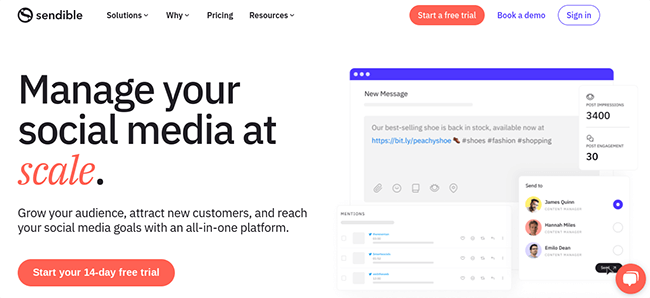
It’s among the best inboxes available. You can use it to manage comments & messages from Twitter, Facebook, Instagram, LinkedIn, and more.
Share postings with your team with ease thanks to an integrated approval system. Moreover, post type and profile filters are available. Message archiving is simple, however if you accidentally archive something, it’s simple to look through previous messages.
Then, all it takes is one button click to return to a real-time stream if necessary.
You also gain access to a very useful social scheduling tool in addition to the inbox. You may create content queues, schedule posts directly to Instagram, and publish posts in bulk. RSS feeds can also be used for automatic sharing.
Then there are the excellent report builder and analytics. Sendible offers a mobile app and is compatible with a wide range of social media platforms.
As a whole? For the money, this is one of the greatest social media tools available. It’s not only within reach of one person. Additionally, it is inexpensive for internal teams and agencies. User accounts are moderately priced.
The only real drawback, though, is that because to Elon’s increased API fees, Sendible’s social inbox feature is no longer compatible with Twitter or X.
Price: Plans start from $29/month which includes access to the social inbox. A free trial is available.
5 – Vista Social
Vista Social is a feature-rich all-in-one social media tool with a very strong social inbox.

Like the other tools on this list, the inbox operates in a similar way. You may respond to all of your social messages by adding your social media accounts.
It’s simple to mark off communications or assign them to a team member thanks to the well-designed user interface. Additionally, you can apply different filters, store replies, and make notes.
Workspaces are not used to divide accounts as they are with certain other programs. Social media accounts are instead categorized by brand. Therefore, depending on your workflow, you can either browse through every message at once or choose which accounts to review.
Although many functions are included in entry-level plans at a low price, some features, such as task management and spam control, are not included in the basic plan.
Apart from the conventional social inbox, Vista Social provides an additional tool that functions similarly, but specifically for online reviews. This enables you to respond to brand reviews from a single interface while keeping an eye on them across several platforms.
The platforms that you can connect to this tool on depend on your plan; this function is not available on the basic plan. All platforms require Advanced or higher to be accessed. Facebook, Google Business, TrustPilot, etc. are a few examples.
Additionally, you have access to a social listening tool that allows you to directly respond to comments and conduct keyword searches. Similar to the review option, this is exclusive to higher plans.
Vista Social is one of the most reasonably priced tools available, even with some of the functionality limitations on different levels.
All the standard publishing and analytics features you would anticipate in a tool of this kind are also included. Compared to other tools on this list, the publishing and scheduling capability is a little less robust. Nonetheless, this offers excellent value for the money.
Vista Social seems to be the most cost-effective option for customer support teams based on its features and pricing.
Price: Plans start from $39/month. Save 20% for yearly billing. Higher plans support more social profiles and users. Try it free for 14 days.
6 – ContentStudio
ContentStudio is another popular all-in-one social media tool with a good unified inbox, amongst other features.
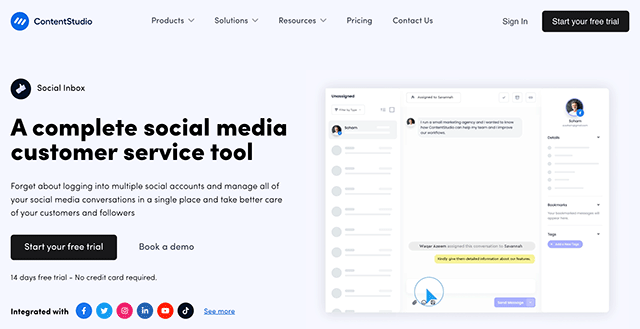
ContentStudio’s social inbox has a good user interface. The remainder of the tool can be configured in the same way. It’s clean, contemporary, and simple to use.
But for now, let’s continue using the inbox. You’ll be able to keep an eye on and respond to messages and comments on Google Business, Facebook, Instagram, LinkedIn, and LinkedIn.
Workspaces are created for accounts by ContentStudio. Thus, you will often have one workspace for each brand. But for a single social network, you can add more than one account. So, for example, if you need to add two different Facebook pages for one brand, you may.
Following the addition of your accounts, comments and messages will begin to accumulate in the inbox.
Numerous options to assist you in filtering these are located on the left side of the inbox.
You can simply respond, forward the message to another team member, and mark it as completed, just as with other tools.
The messages and comments will show up as a list when you see them. Simply pick the desired one, and the entire view will appear on the UI’s right side.
What ContentStudio has done differently is to make this aspect of the UI mirror that of the social network the message or remark comes from. For example, responding to several comments on the same topic is made particularly simple by this.
The primary constraint is the lack of support for Twitter/X. This is due to their API’s absurd price increases, just like other tools. . As a point of reference, Twitter/X has started demanding hundreds of thousands of dollars per years from tools for access to it’s API. That’s not sustainable for social media companies. And, as a point of reference, Meta’s API’s for Instagram and Facebook are free.
Price: Plans start from $25/month but you’ll need the Pro plan to have access to the inbox. That costs $49/month. A free trial is available.
7 – Sprout Social
Sprout Social is a leading all-in-one SMM tool that features an extremely strong social media inbox.
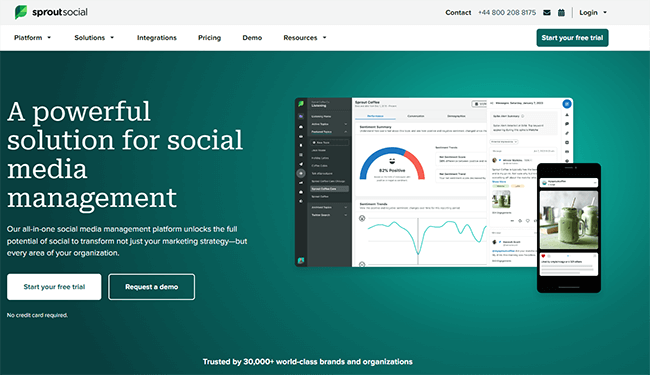
One great feature of this application is its social inbox. It has an incredibly rich feature set and an excellent user experience.
For instance, in addition to the standard functions of a unified inbox, you get enhanced automation, team approval workflow, and the ability to know when other team members are replying—all of which are very helpful in preventing crossovers.
To increase efficiency even more, you can filter your inbox based on the kind of communication and the social profile in question.
Moreover, an all-in-one social media solution has all the additional capabilities you might anticipate, such robust social scheduling, data-rich analytics & reporting, and more.
In comparison to other social media inbox solutions on our list, Sprout Social is very pricey.
For smaller businesses, the cost is a deal-breaker.
Price: Starts from $249/month, save up to 25% with annual billing. A free trial is available.
Factors to Consider When Choosing a Social Media Inbox Tool
A. Supported Social Media Platforms
When selecting a social media inbox tool, the first factor to consider is the range of supported platforms. Not all tools integrate with every social media channel, so it’s vital to choose one that covers the platforms your audience uses most. According to Statista, as of 2023, Facebook remains the most widely used social media platform, with 2.96 billion monthly active users, followed closely by Instagram (2.4 billion) and Twitter (450 million). If your brand actively engages on multiple platforms, ensure that the tool provides seamless integration across all these channels.
Example
For instance, tools like Sprout Social offer comprehensive support for major platforms, including Facebook, Twitter, Instagram, LinkedIn, and even emerging platforms like TikTok. If your brand primarily operates on a niche platform, make sure the tool you choose supports it; otherwise, you risk losing valuable engagement opportunities.
B. Ease of Use and User Interface
The usability of a social media inbox tool significantly impacts how effectively your team can manage interactions. A user-friendly interface allows team members to navigate the tool easily, reducing the learning curve and improving overall efficiency. According to a survey by UserTesting, 85% of users believe that a seamless user experience enhances their productivity.
Example
Consider Buffer, which is renowned for its intuitive design. New users can quickly familiarize themselves with its features, allowing for faster onboarding and effective usage right from the start. In contrast, a more complex interface may lead to user frustration and decreased productivity.
C. Scalability
As your business grows, so too will your social media interactions. Choose a tool that can scale alongside your organization. Scalability features may include the ability to add more users, increase the number of connected social media accounts, and upgrade capabilities without significant disruption.
Data
A report from Gartner suggests that 70% of organizations that fail to adapt their technology solutions as they grow experience operational inefficiencies. Thus, selecting a tool with a proven track record of scalability can be crucial for future growth.
Example
Zendesk’s social media tool allows businesses to easily expand their account capabilities. As a company increases its social media presence, it can seamlessly add new users and additional integrations without requiring a complete overhaul of the existing setup.
D. Integration Capabilities
Integration with existing tools is another crucial factor when choosing a social media inbox tool. Look for solutions that can connect with Customer Relationship Management (CRM) systems, marketing automation platforms, and other software your team uses. Effective integration enables a more streamlined workflow, ensuring that customer data and interactions are cohesive.
Example
Tools like Agorapulse offer robust integrations with various CRMs such as Salesforce and HubSpot. This allows teams to access customer data while responding to inquiries, leading to more informed and personalized interactions.
E. Pricing and Plans
Pricing can vary significantly across different social media inbox tools, often reflecting the features and capabilities offered. When evaluating pricing, consider your budget and what features are essential for your team’s needs. Some tools may offer tiered pricing plans that provide a basic set of features, while others may include advanced functionalities at a higher cost.
Data
According to a survey by Capterra, 40% of small businesses are willing to spend up to $50 per month on social media management tools. It’s essential to balance cost with value; cheaper tools may lack critical features that enhance productivity and engagement.
Example
For instance, Buffer offers a free tier for small teams, with scalable paid plans that add features like analytics and integrations as needed. This flexibility allows businesses to start small and expand as they grow.
F. Customer Support and Training Resources
Finally, effective customer support and training resources are essential when selecting a social media inbox tool. Ensure that the provider offers comprehensive support options, including live chat, email assistance, and extensive documentation. Training resources, such as tutorials and webinars, can help your team maximize the tool’s potential.
Data
According to a report from Zendesk, 61% of customers feel that customer support is a critical factor in their choice of a brand. Therefore, robust support can enhance user satisfaction and retention.
Example
Intercom provides excellent customer support, including a detailed knowledge base, community forums, and live chat. Their training resources help teams onboard quickly and troubleshoot issues effectively, ensuring a smooth operational experience.
Best Practices for Using Social Media Inbox Tools
A. Setting Up Efficient Workflows
Establishing efficient workflows is essential for maximizing the effectiveness of your social media inbox tool. Create clear processes for how inquiries are handled, including who responds to specific types of messages and how escalations are managed. Using labels and tags within the tool can help categorize messages, making it easier for teams to prioritize their responses.
Example
For instance, setting up workflows where customer service inquiries are handled by specific team members while general comments are managed by social media managers can streamline the process. This division of labor allows for quicker response times and ensures that messages are addressed by the appropriate personnel.
B. Training Team Members Effectively
Training your team members on how to use the social media inbox tool is vital for success. Invest time in training sessions to familiarize them with the features, functionalities, and best practices. Consider role-playing scenarios to help them practice responding to various customer inquiries effectively.
Data
According to a report from LinkedIn, companies that invest in employee training can see a 24% higher profit margin than those that don’t. This underscores the importance of training in enhancing team performance and customer interactions.
C. Establishing Response Time Goals
Setting clear response time goals can help ensure that customer inquiries are addressed promptly. Research by HubSpot indicates that 90% of consumers consider an immediate response as important when they have a marketing or sales question. By establishing benchmarks, your team can strive to meet or exceed customer expectations.
Example
A common goal for many brands is to respond to customer inquiries within one hour during business hours. Regularly review performance against these goals to identify areas for improvement and recognize high-performing team members.
D. Personalizing Automated Responses
While automation can save time, it’s essential to personalize automated responses to maintain a human touch. Use the customer’s name and tailor messages based on their inquiries or previous interactions. According to a study by Segment, 44% of consumers say they are likely to become repeat buyers after a personalized shopping experience.
Example
An automated response that acknowledges a customer’s specific question, such as “Hi [Name], thanks for reaching out about [Product/Service]. We appreciate your interest!” can significantly enhance customer satisfaction.
E. Regularly Reviewing Analytics and Adjusting Strategies
Finally, regularly review analytics and performance metrics to assess the effectiveness of your social media inbox tool. Identify trends in customer inquiries, response times, and engagement rates. Use this data to adjust your strategies and workflows for continuous improvement.
Data
A survey by Google found that organizations that utilize data analytics are five times more likely to make faster decisions than their competitors. Regularly reviewing and analyzing data can lead to improved efficiency and customer satisfaction.
Example
Using insights from analytics, if you find that most inquiries occur during specific times, you can adjust staffing levels to ensure prompt responses. Additionally, if certain types of messages are consistently unanswered or delayed, you can refine your workflows to address these gaps.
By considering these factors and implementing best practices, businesses can effectively leverage social media inbox tools to enhance customer interactions, streamline operations, and foster brand loyalty.